
Voting Machine Simulator in java
introduction
TheVoting Machine Simulator in java is a Java-based project that mimics the operation of a real electronic voting machine (EVM). Voters can select candidates from a displayed list, and the system ensures one vote per voter through a unique ID check.
Once the voting is complete, the admin can unlock the result screen to display vote counts per candidate. This project demonstrates how secure, transparent, and tamper-proof digital voting systems can work.
It’s suitable for civic education, mock elections in schools/colleges, and technical demonstrations on event-driven programming and data validation in Java.
steps to create voting machine stimulator in java
Define voting rules — one vote per voter.
Design voter authentication GUI.
Create Candidate and Voter classes.
Implement voting logic with vote counting.
Store votes securely.
Prevent duplicate voting by voter ID.
Add admin interface for result display.
Test voting, counting, and result display.
Add error handling.
Document code and user instructions.
code explanation
1. Window Setup
setTitle("Voting Machine Simulator");
setSize(600, 400);
Creates a window titled “Voting Machine Simulator”.
2. Top Heading
JLabel heading = new JLabel("Electronic Voting Machine");
Adds a nice title label at the top with background color and font styling.
3. Vote Buttons
votePanel.add(createVoteButton("Candidate A", blue));
3 buttons are created: “Vote Candidate A”, “Vote Candidate B”, “Vote Candidate C”.
Each button has a color and a label.
When a button is clicked:
It increases that candidate’s vote count.
The results are updated immediately.
4. Results Display
lblVotesA = createResultLabel("Votes A: 0");
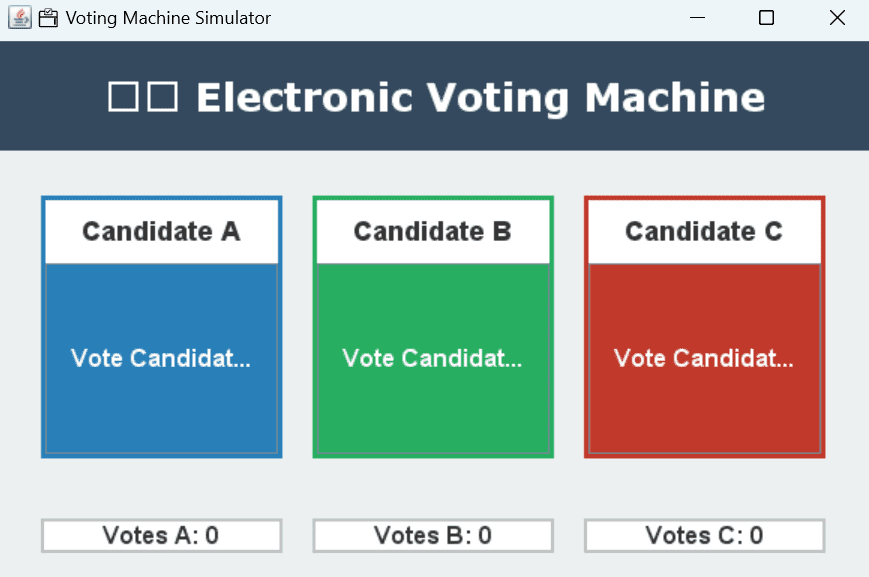
At the bottom, it shows current vote count for each candidate.
Initially all are 0 votes.
5. Clicking the Button
btn.addActionListener(e -> {
   if (name contains "A") votesA++;
   ...
   updateResults();
});
When you click on any vote button:
It checks which candidate the button is for.
Adds 1 to their vote count.
Then updates the display.
6. Running the App
public static void main(String[] args) {
    SwingUtilities.invokeLater(() -> new VotingMachineSimulator().setVisible(true));
}
This runs the GUI on screen.
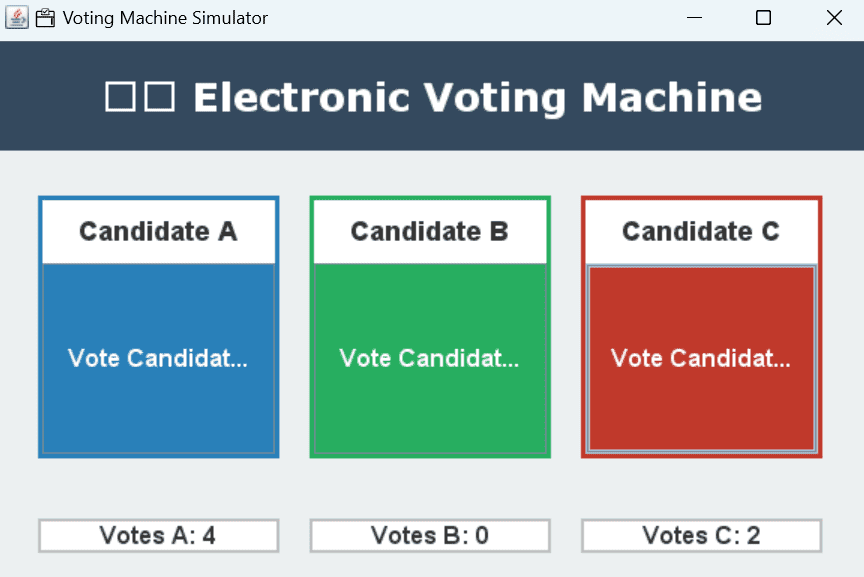
Output Preview:
Top: “Electronic Voting Machine”
Center: 3 colored buttons for Candidate A, B, and C
Bottom: Vote count for each candidate, like:
Votes A: 3 Votes B: 2 Votes C: 1
source code
					import javax.swing.*;
import java.awt.*;
import java.awt.event.*;

public class VotingMachineSimulator extends JFrame {
    private int votesA = 0, votesB = 0, votesC = 0;

    private JLabel lblVotesA, lblVotesB, lblVotesC;

    public VotingMachineSimulator() {
        setTitle("🗳️ Voting Machine Simulator");
        setSize(600, 400);
        setLocationRelativeTo(null);
        setDefaultCloseOperation(EXIT_ON_CLOSE);
        setLayout(new BorderLayout());

        JLabel heading = new JLabel("🗳️ Electronic Voting Machine", JLabel.CENTER);
        heading.setFont(new Font("Verdana", Font.BOLD, 26));
        heading.setOpaque(true);
        heading.setBackground(new Color(52, 73, 94));
        heading.setForeground(Color.white);
        heading.setBorder(BorderFactory.createEmptyBorder(20, 0, 20, 0));
        add(heading, BorderLayout.NORTH);

        JPanel votePanel = new JPanel(new GridLayout(1, 3, 20, 20));
        votePanel.setBorder(BorderFactory.createEmptyBorder(30, 30, 30, 30));
        votePanel.setBackground(new Color(236, 240, 241));

        votePanel.add(createVoteButton("Candidate A", new Color(41, 128, 185)));
        votePanel.add(createVoteButton("Candidate B", new Color(39, 174, 96)));
        votePanel.add(createVoteButton("Candidate C", new Color(192, 57, 43)));

        add(votePanel, BorderLayout.CENTER);

        JPanel resultPanel = new JPanel(new GridLayout(1, 3, 20, 20));
        resultPanel.setBorder(BorderFactory.createEmptyBorder(10, 30, 20, 30));
        resultPanel.setBackground(new Color(236, 240, 241));

        lblVotesA = createResultLabel("Votes A: 0");
        lblVotesB = createResultLabel("Votes B: 0");
        lblVotesC = createResultLabel("Votes C: 0");

        resultPanel.add(lblVotesA);
        resultPanel.add(lblVotesB);
        resultPanel.add(lblVotesC);

        add(resultPanel, BorderLayout.SOUTH);
    }

    private JPanel createVoteButton(String name, Color color) {
        JButton btn = new JButton("Vote " + name);
        btn.setFont(new Font("Arial", Font.BOLD, 16));
        btn.setBackground(color);
        btn.setForeground(Color.white);
        btn.setFocusPainted(false);

        btn.addActionListener(e -> {
            if (name.contains("A")) votesA++;
            else if (name.contains("B")) votesB++;
            else if (name.contains("C")) votesC++;
            updateResults();
        });

        JPanel panel = new JPanel(new BorderLayout());
        JLabel label = new JLabel(name, JLabel.CENTER);
        label.setFont(new Font("Arial", Font.BOLD, 18));
        label.setBorder(BorderFactory.createEmptyBorder(10, 0, 10, 0));

        panel.setBackground(Color.white);
        panel.setBorder(BorderFactory.createLineBorder(color, 3));
        panel.add(label, BorderLayout.NORTH);
        panel.add(btn, BorderLayout.CENTER);

        return panel;
    }

    private JLabel createResultLabel(String text) {
        JLabel label = new JLabel(text, JLabel.CENTER);
        label.setFont(new Font("Arial", Font.BOLD, 16));
        label.setOpaque(true);
        label.setBackground(Color.white);
        label.setBorder(BorderFactory.createLineBorder(Color.LIGHT_GRAY, 2));
        return label;
    }

    private void updateResults() {
        lblVotesA.setText("Votes A: " + votesA);
        lblVotesB.setText("Votes B: " + votesB);
        lblVotesC.setText("Votes C: " + votesC);
    }

    public static void main(String[] args) {
        SwingUtilities.invokeLater(() -> new VotingMachineSimulator().setVisible(true));
    }
}
output
Get Huge Discounts