

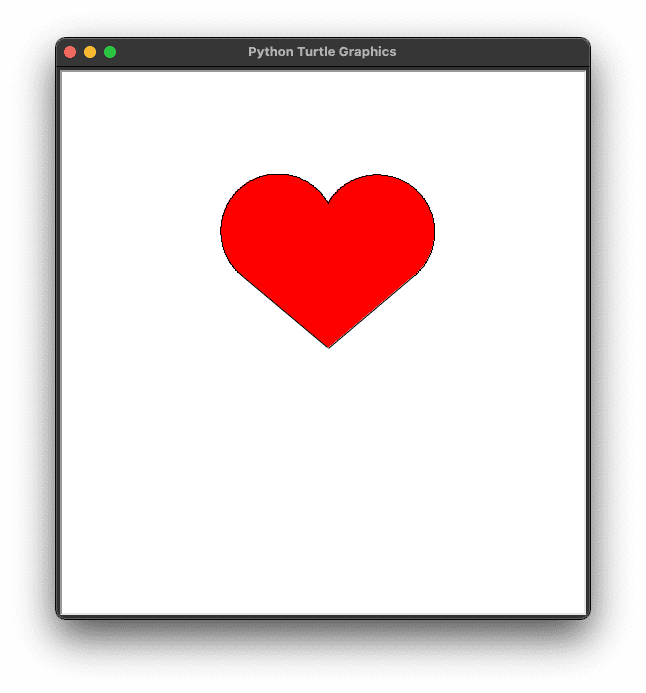

Draw a Heart Using Python Turtle with Source Code

Introduction :

This tutorial teaches you how to draw a heart using the Python Turtle for beginners. The way to draw a heart in Python is by listening for control codes and looping. Control codes are special types of coding that give instructions for what the machine needs to do next as long as it is related to drawing and movement. And loops tell the computer to do something repeatedly, which we need if we’re going to use loops to create shapes from scratch like this one. First, we need to import the turtle module and create a turtle. Next, we need to set the color of the turtle to red and then move it forward 100 pixels. Finally, we need to draw a line by turning left 90 degrees and drawing a line for 100 pixels. In this section, we will learn how to draw a heart using Python Turtle.

Source Code :

Get Discount on Top Educational Courses

Brand NameDiscount InformationCoupon Codes Link
Educative.io20% discount on Educative courses and plans
W3Schools20% discount on W3Schools courses
KodeKloud10% discount on KodeKloud courses and plans
GeeksforGeeks30% discount on GeeksforGeeks courses
Target Test Prep20% discount on Target Test Prep
Coding Ninjas₹5000 discount on Coding Ninjas courses
Skillshare40% discount on Skillshare
DataCamp50% discount on DataCamp
365 Data Science57% discount on 365 Data Science Plans
Get SmarterFlat 20% discount on Get Smarter courses
SmartKeedaFlat 40% discount on SmartKeeda courses
StackSocial20% discount on StackSocial courses
				
					#impress your crush using python

# importing the turtle module 
import turtle

# Creating an wr object of turtle
wr = turtle.Turtle()

# Setting Color
wr.fillcolor('red')
# Filling the color
wr.begin_fill()

# Start Drawing the Heart
wr.left(140)
wr.forward(113)

# Drawing the carve of heart
for i in range(200):
    wr.right(1)
    wr.forward(1)
wr.left(120)


# Drawing the carve of heart
for i in range(200):
    wr.right(1)
    wr.forward(1)

wr.forward(112)
# Ending the filling color
wr.end_fill()
wr.ht()


Output:

Find More Projects

URL Shortener Using Python Django Introduction: Long URLs can be shortened into short, shareable links with the help of the URL Shortener …

User Authentication System Using Python Django Introduction: The implementation of safe and adaptable user authentication in Django is the main goal of …

The E-Learning System using Java with a Graphical User Interface (GUI) Introduction The E-Learning System is developed using Java (with a Graphical …

Weather App Using Python Django Introduction: When a user enters the name of a city, the Weather App retrieves current weather information. …

Quiz App Using Python Django Introduction: Users can take quizzes in a variety of subjects, see their results, and monitor their progress …

resume screener in python using python introduction The hiring process often begins with reviewing numerous resumes to filter out the most suitable …

Leave a Comment

Your email address will not be published. Required fields are marked *